Case study:

HMRC - Claim tax relief for job expenses

Transforming government forms in to a user tested service

My role

Claim tax relief for job expenses screen

About the project

Claim tax relief for PAYE expenses is a government service that helps employed people claim tax relief on eligible work expenses, including professional subscriptions, uniforms and some travel expenses.

I worked on the service for around two years as the interaction designer, helping turn an inherited set of online forms into a question-based service that could be prototyped, tested and iterated with users.

I worked across around 40 screens and four journeys, alongside user researchers, content designers, service designers, business analysts, product managers and developers. The service is now in beta.

Claim summary from the Claim tax relief for PAYE expenses service The claim summary in the new service.

The starting point

When I joined the project, the service was made up of existing iForms. These had been developed over time and were already being used to collect the information needed to process PAYE expense claims.

The iForms were essentially “dumb” forms. They collected whatever the user entered, but didn't know much about the person completing them or what they had already told the service. This limited how much the service could adapt the questions or guide someone through the journey based on their circumstances.

The forms also didn't follow the one-question-per-page approach used by GOV.UK services. Several questions and actions could appear together on a single page.

There was no existing prototype, and the project hadn't gone through a formal discovery phase. The wider programme was also moving services onto a new platform, so part of the work was to take the existing service and redesign it for the new environment.

I started by taking the existing questions and requirements and building them into the GOV.UK Prototype Kit. This gave us a working version of the journey that we could use to explore different approaches and take into research.

The original PAYE expenses iForm The existing iForm that the project started from.

Early design ideas

My initial design for the service was a dashboard.

It showed the user's eligible tax years, the expenses they had already claimed and links to make new claims or view previous ones. I designed it to give people somewhere to manage their claims.

Early version of the PAYE expenses dashboard The first dashboard concept

We put it in front of users and, while people could use it, the research didn't give us much evidence that they actually needed it. Most people were focused on making a new claim rather than managing previous ones.

It also meant introducing a fairly complicated pattern of tabs, tables and actions before we had established that this was something users wanted.

I went back to the journey and looked at what we were actually asking people to do. The main task was much simpler: choose the expense they wanted to claim and work through the questions.

We changed the approach so that the journey started with a question about the expense rather than a dashboard.

That was an early example of research changing the direction of the design rather than just helping us tidy up an existing interface.

Replacing the dashboard

Although we removed the dashboard, there were still useful things we needed to give people.

Users needed to see which years they could claim for and be able to add expenses to those years. They also needed to see what they had already added as they worked through the service.

This led to the claim summary.

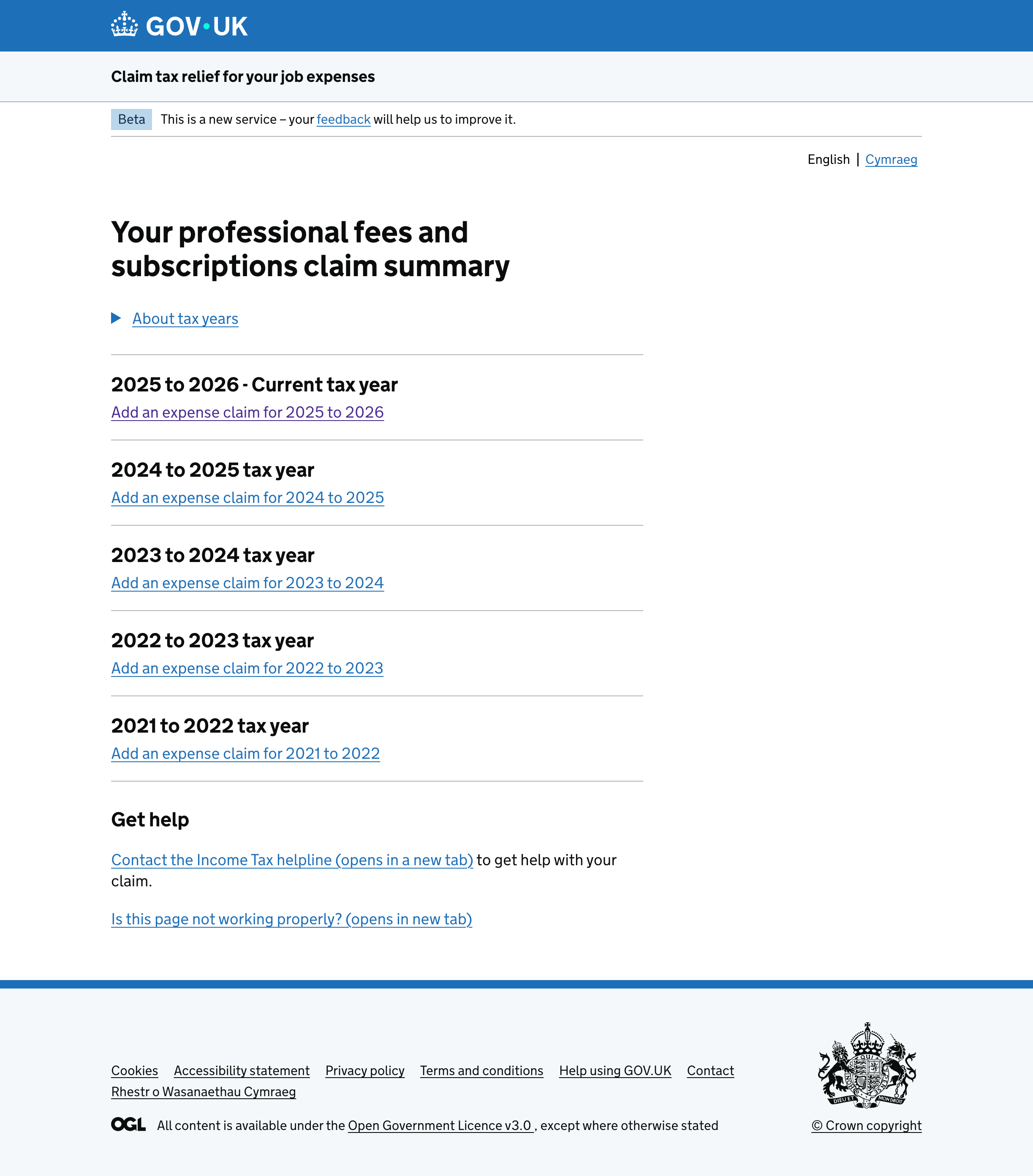
Claim summary showing the tax years available to claim for The claim summary became the centre of the journey.

The summary sits at the centre of the journey. Users can choose a year, add an expense and answer the relevant questions before coming back to the summary.

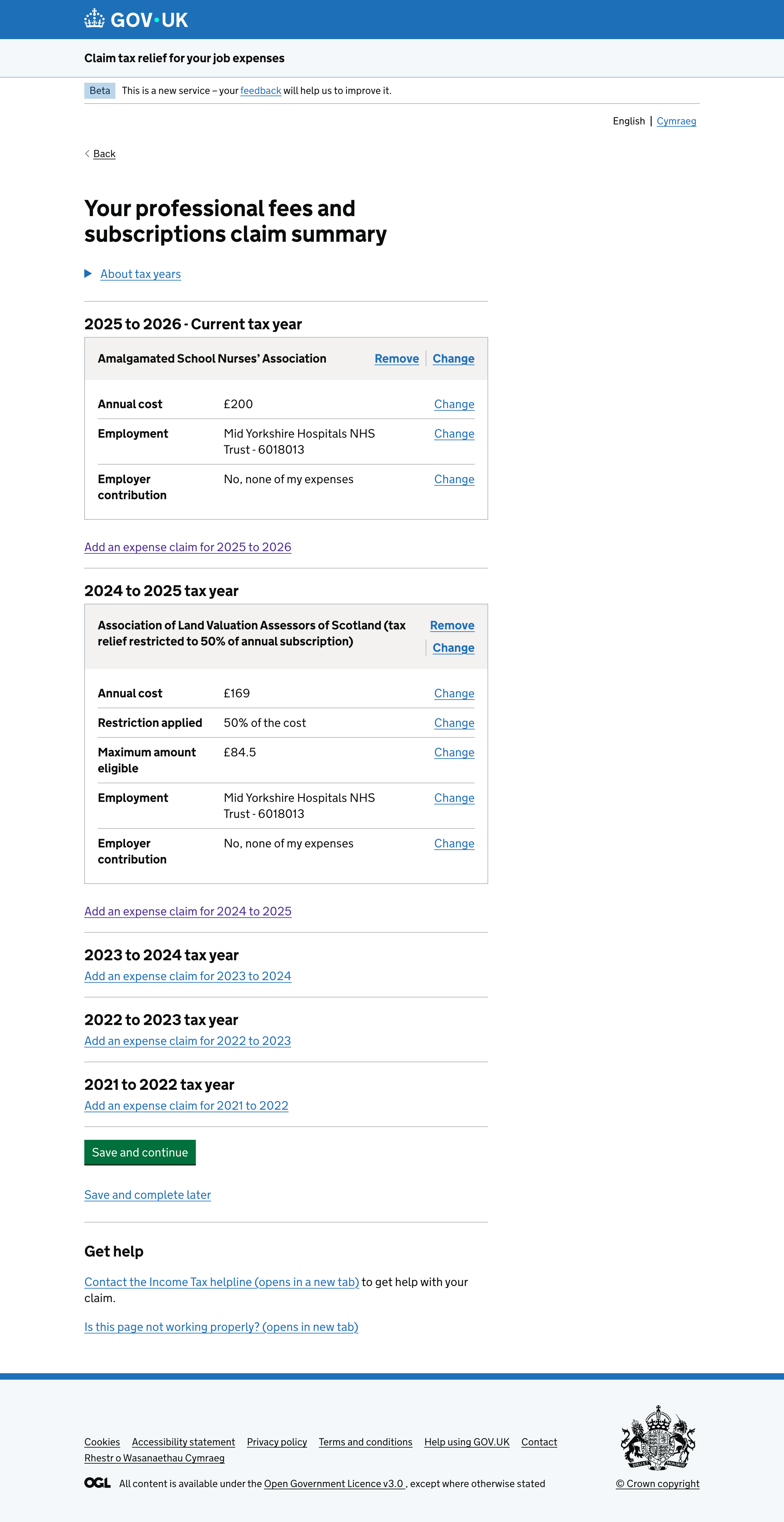
Claim summary showing an expense that has been added The summary updates as users add expenses to their claim.

Once a claim has been added, the summary changes to show what has been entered. People can continue adding expenses and build up their claim across multiple years.

This gave us a much simpler way of providing some of the functionality we'd originally been trying to achieve with the dashboard, without asking users to navigate a separate management interface.

Changing the way travel expenses were asked

Travel expenses were one of the areas where research had a noticeable effect on the interaction.

Travel expenses journey showing the original and redesigned interaction The travel expenses interaction before and after the redesign.

The original form asked people how much they had spent on allowable items. There was some explanatory text underneath listing examples of things that could and couldn't be claimed.

When we tested this, people weren't always sure what counted as an allowable expense. One participant said:

“Now I am confused, if I haven’t stayed there, am I allowed to claim my food, or just if I stayed in a hotel?”

We could have tried rewriting the explanation, but the underlying problem was the question itself. We were asking people to interpret the rules and work out which costs should be included in one amount.

I changed the interaction so people could select the types of travel expense they were claiming for and then enter an amount for each one.

That made the question much more concrete. Instead of working out what belonged in a single total, people could recognise the expenses they had actually incurred and enter them separately.

It also helped later in the process because caseworkers could see the individual amounts when checking supporting evidence.

Making industry selection less complicated

Another part of the service asked people to select their industry.

The first version used a series of categories and subcategories. In theory this gave us a structured way of collecting the information, but when we tested it people weren't always sure which category their job belonged to.

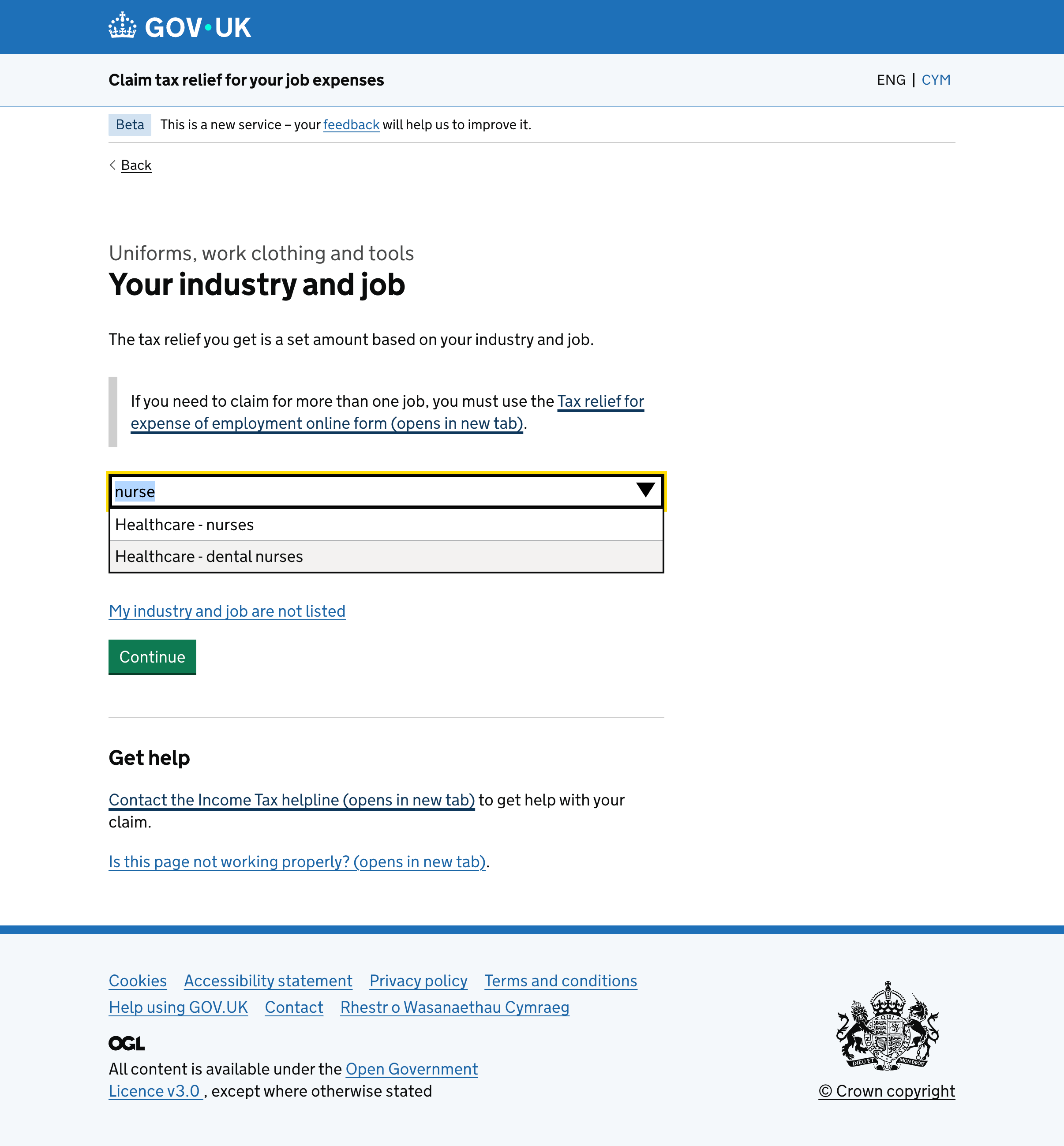
I changed this to an autocomplete interaction. Rather than making people understand the categories we'd created, they could start typing a keyword and select an appropriate industry from the results.

Industry selection using an autocomplete input The autocomplete interaction reduced the number of decisions users had to make.

It was a relatively small change, but it removed several screens and, more importantly, removed a decision that we were asking users to make because of the way we'd structured the data.

There was a delivery benefit too. The development effort for the service was partly affected by the number of screens, so reducing the number of screens made this simpler to build as well.

The outcome

The service is now in beta.

Compared with the forms I started with, the journey is broken into individual questions and users can build their claim across multiple eligible years.

The travel journey captures individual expenses rather than asking for one combined figure, and the industry selection no longer requires people to work through a hierarchy of categories.

The evidence journey can also be completed without uploading evidence, in line with the policy requirement.

Caseworkers have said that checking evidence is easier and quicker than before, particularly where the information submitted by the user is broken down into individual expenses.

We've also added eligibility information and checks at points in the journey where they are relevant, helping prevent people from completing claims when they don't meet the requirements.

There are still things we need to measure as the service develops in beta, particularly around the longer-term impact and performance of the service.

View from the client

In an ever-changing environment you have always risen to any challenge and resolved problems using your knowledge of how a service will work best for the customer. Your willingness to take on feedback from several, often conflicting, stakeholder groups and come up with ideas that suit the needs of all always impresses me.

It is not only the work you do on design that stands out, but also your willingness to do extra. For example, presenting designs to wider groups within HMRC to give them a clear understanding of what we are trying to achieve and providing explanations on why certain decisions were made. This does not go unnoticed and is a valuable help to us as Product Managers and makes stakeholder management much easier.

Product Manager, Expenses service

My role

I was responsible for the interaction design across around 40 screens and four journeys.

A lot of the work was taking things that arrived in different forms — existing questions, policy requirements, business needs, technical constraints and research findings — and turning them into something the team could actually prototype and discuss.

I worked particularly closely with the user researcher and content designer, while using prototypes and user-flow documentation to communicate with the wider team.

The project also changed the way I think about the role of an interaction designer on a large government service. Some of the most useful design work wasn't creating a new screen. It was questioning why the screen was needed, understanding where a requirement had come from, or finding a simpler way of asking the user to do something.

The service is still evolving, but the distance between the original forms and what we're now testing with users has been substantial.

Up next:

Get into Teaching

Working with the DfE to create new site to bridge successful advertising with a government service. Check it out
Get into Teaching Site finished

Get in touch